작가:
    생성:2024-03-07마지막 업데이트:2026-06-23

    Intlayer를 사용하여 Astro 사이트 번역하기 | 국제화 (i18n)

    ide.intlayer.org
    intlayer-astro-template.vercel.app

    목차

    대안보다 Intlayer를 선택해야 하는 이유는 무엇입니까?

    'astro-i18n' 또는 'i18next'와 같은 주요 솔루션과 비교할 때 Intlayer는 다음과 같은 통합 최적화가 제공되는 솔루션입니다.

    Intlayer는 다국어 라우팅, 사이트맵 및 국제화 확장(i18n)에 필요한 모든 기능을 제공하여 Astro와 완벽하게 작동하도록 최적화되어 있습니다.

    대용량 JSON 파일을 페이지에 로드하는 대신 필요한 콘텐츠만 로드하세요. Intlayer는 번들 및 페이지 크기를 최대 50% 줄이는 데 도움이 됩니다.

    애플리케이션 콘텐츠의 범위를 지정하면 대규모 애플리케이션의 유지 관리가 용이해집니다. 전체 콘텐츠 코드베이스를 검토해야 하는 정신적 부담 없이 단일 기능 폴더를 복제하거나 삭제할 수 있습니다. 또한 Intlayer는 완전히 유형되어 콘텐츠의 정확성을 보장합니다.

    콘텐츠를 같은 위치에 배치하면 LLM(대형 언어 모델)에 필요한 컨텍스트가 줄어듭니다. Intlayer에는 누락된 번역을 테스트하기 위한 CLI, LSP, MCPagent skills, AI 에이전트를 위한 개발자 경험(DX)을 더욱 원활하게 만듭니다.

    AI 공급자의 비용으로 선택한 LLM을 사용하여 CI/CD 파이프라인을 번역하려면 자동화를 사용하세요. Intlayer는 또한 콘텐츠 추출을 자동화하는 컴파일러백그라운드에서 번역을 돕는 웹 플랫폼을 제공합니다.

    대규모 JSON 파일을 구성 요소에 연결하면 성능 및 반응성 문제가 발생할 수 있습니다. Intlayer는 빌드 시 콘텐츠 로딩을 최적화합니다.

    Intlayer는 단순한 i18n 솔루션 그 이상으로 관리에 도움이 되는 자체 호스팅 비주얼 편집기전체 CMS를 제공합니다. 다국어 콘텐츠를 실시간으로 제공하여 번역가, 카피라이터, 기타 팀원과 원활하게 협업할 수 있습니다. 콘텐츠는 로컬 및/또는 원격으로 저장될 수 있습니다.


    Astro에서 Intlayer 설정을 위한 단계별 가이드

    GitHub에서 애플리케이션 템플릿 보기.

    1. 종속성 설치

      선호하는 패키지 관리자를 사용하여 필요한 패키지를 설치합니다:

      bash
      npx intlayer init --interactive
      
      --interactive 플래그는 선택 사항입니다. AI 에이전트인 경우 intlayer-cli init을 사용하세요.
      이 명령어는 당신의 환경을 감지하고 필요한 패키지를 설치합니다. 예를 들어:
      bash
      npm install intlayer astro-intlayer
      
      bash
      npm install intlayer astro-intlayer
      # 선택 사항: React 아일랜드 지원 추가 시
      npm install react react-dom react-intlayer @astrojs/react
      
      • intlayer 설정 관리, 번역, 콘텐츠 선언, 트랜스파일 및 CLI 명령어를 위한 국제화 도구를 제공하는 핵심 패키지입니다.

      • astro-intlayer Intlayer를 Vite 번들러와 통합하기 위한 Astro 통합 플러그인과 사용자의 선호 로케일을 감지하고 쿠키를 관리하며 URL 리디렉션을 처리하는 미들웨어가 포함되어 있습니다.

    2. 프로젝트 설정

      애플리케이션의 언어를 설정하기 위한 설정 파일을 생성합니다:

      intlayer.config.ts
      import { Locales, type IntlayerConfig } from "intlayer";
      
      const config: IntlayerConfig = {
        internationalization: {
          locales: [
            Locales.ENGLISH,
            Locales.FRENCH,
            Locales.SPANISH,
            // 기타 로케일
          ],
          defaultLocale: Locales.ENGLISH,
        },
      };
      
      export default config;
      
      이 설정 파일을 통해 로컬라이즈된 URL, 미들웨어 리디렉션, 쿠키 이름, 콘텐츠 선언 위치 및 확장자 설정, 콘솔의 Intlayer 로그 비활성화 등을 구성할 수 있습니다. 사용 가능한 파라미터의 전체 목록은 설정 문서를 참조하세요.
    3. Astro 설정에 Intlayer 통합

      Astro 설정에 intlayer 플러그인을 추가합니다.

      astro.config.ts
      // @ts-check
      
      import { intlayer } from "astro-intlayer";
      import { defineConfig } from "astro/config";
      
      // https://astro.build/config
      export default defineConfig({
        integrations: [intlayer()],
      });
      
      intlayer() 통합 플러그인은 Intlayer를 Astro와 통합하는 데 사용됩니다. 콘텐츠 선언 파일의 빌드를 보장하고 개발 모드에서 이를 감시합니다. Astro 애플리케이션 내에서 Intlayer 환경 변수를 정의하며, 성능 최적화를 위한 에일리어스(alias)를 제공합니다.
    4. 콘텐츠 선언

      번역을 저장하기 위해 콘텐츠 선언을 생성하고 관리합니다:

      src/app.content.tsx
      import { t, type Dictionary } from "intlayer";
      import type { ReactNode } from "react";
      
      const appContent = {
        key: "app",
        content: {
          title: t({
            en: "Hello World",
            fr: "Bonjour le monde",
            es: "Hola mundo",
            ko: "안녕하세요",
          }),
        },
      } satisfies Dictionary;
      
      export default appContent;
      
      콘텐츠 선언은 contentDir(기본값 ./src)에 포함되어 있고 콘텐츠 선언 파일 확장자(기본값 .content.{json,ts,tsx,js,jsx,mjs,cjs,md,mdx,yaml,yml})와 일치한다면 애플리케이션 어디에서나 정의할 수 있습니다.
      자세한 내용은 콘텐츠 선언 문서를 참조하세요.
    5. Astro에서 콘텐츠 사용

      intlayer에서 내보낸 핵심 헬퍼를 사용하여 .astro 파일에서 직접 사전을 소비할 수 있습니다.

      src/pages/index.astro
      ---
      import {
        getIntlayer,
        getLocaleFromPath,
        getLocalizedUrl,
        defaultLocale,
        localeMap,
        getHTMLTextDir,
        type LocalesValues,
      } from "intlayer";
      import LocaleSwitcher from "../components/LocaleSwitcher.astro";
      
      // Get the current locale from the URL (e.g. /es/about -> 'es')
      const locale = getLocaleFromPath(Astro.url.pathname) as LocalesValues;
      
      // Get the content for the 'app' dictionary
      const { title } = getIntlayer("app", locale);
      ---
      
      <!doctype html>
      <html lang={locale} dir={getHTMLTextDir(locale)}>
        <head>
          <meta charset="utf-8" />
          <meta name="viewport" content="width=device-width" />
          <link rel="icon" type="image/svg+xml" href="/favicon.svg" />
          <title>{title}</title>
      
          <!-- Canonical link: Tells search engines which is the primary version of this page -->
          <link
            rel="canonical"
            href={new URL(getLocalizedUrl(Astro.url.pathname, locale), Astro.site)}
          />
      
          <!-- Hreflang: Tell Google about all localized versions -->
          {
            localeMap(({ locale: mapLocale }) => (
              <link
                rel="alternate"
                hreflang={mapLocale}
                href={new URL(
                  getLocalizedUrl(Astro.url.pathname, mapLocale),
                  Astro.site
                )}
              />
            ))
          }
      
          <!-- x-default: Fallback for users in unmatched languages -->
          <link
            rel="alternate"
            hreflang="x-default"
            href={new URL(
              getLocalizedUrl(Astro.url.pathname, defaultLocale),
              Astro.site
            )}
          />
        </head>
        <body>
          <header>
            <LocaleSwitcher />
          </header>
          <main>
            <h1>{title}</h1>
          </main>
        </body>
      </html>
      
    6. 로컬라이즈된 라우팅

      로컬라이즈된 페이지를 제공하기 위해 동적 라우트 세그먼트를 생성합니다(예: src/pages/[locale]/index.astro):

      src/pages/[locale]/index.astro
      <!-- astro -->
      ---
      import { getIntlayer } from "intlayer";
      
      const { title } = getIntlayer('app');
      ---
      
      <h1>{title}</h1>
      

      Astro 통합은 개발 중에 언어 인식 라우팅 및 환경 정의를 돕는 Vite 미들웨어를 추가합니다. 또한 직접 로직을 작성하거나 intlayergetLocalizedUrl과 같은 유틸리티를 사용하여 언어 간 링크를 생성할 수 있습니다.

    7. 언어 선택기 추가

      사용자가 언어를 전환할 수 있도록 LocaleSwitcher 컴포넌트를 만들 수 있습니다. 이 컴포넌트는 지원되는 모든 로케일 목록을 표시하고 각 언어로 동일한 페이지에 링크해야 합니다.

      src/components/LocaleSwitcher.astro
      ---
      import {
        locales,
        getLocaleName,
        getLocalizedUrl,
        getLocaleFromPath,
        getPathWithoutLocale,
        type LocalesValues,
      } from "intlayer";
      
      const locale = getLocaleFromPath(Astro.url.pathname) as LocalesValues;
      const pathWithoutLocale = getPathWithoutLocale(Astro.url.pathname);
      ---
      
      <nav>
        {
          locales.map((localeItem) => (
            <a
              href={getLocalizedUrl(pathWithoutLocale, localeItem)}
              data-locale={localeItem}
              aria-current={localeItem === locale ? "page" : undefined}
            >
              {getLocaleName(localeItem)}
            </a>
          ))
        }
      </nav>
      
      <script>
        import { setLocaleInStorageClient, getLocalizedUrl, type LocalesValues } from "intlayer";
      
        const localeLinks = document.querySelectorAll("[data-locale]");
      
        localeLinks.forEach((link) => {
          link.addEventListener("click", (e) => {
            const locale = link.getAttribute("data-locale") as LocalesValues;
      
            // Update the locale cookie
            setLocaleInStorageClient(locale);
          });
        });
      </script>
      
      <style>
        nav {
          display: flex;
          gap: 1rem;
        }
        a[aria-current="page"] {
          font-weight: bold;
          text-decoration: underline;
        }
      </style>
      

      지속성에 대한 참고 사항: 클라이언트 측 스크립트에서 setLocaleInStorageClient를 사용하면 사용자의 언어 선호도가 쿠키에 저장됩니다. 이를 통해 Intlayer 미들웨어는 선택을 기억하고 향후 방문 시 사용자가 선호하는 언어로 자동으로 리다이렉트할 수 있습니다.

    8. Sitemap 및 Robots.txt

      Intlayer는 동적으로 로컬라이즈된 사이트맵과 robots.txt 파일을 생성하기 위한 유틸리티를 제공합니다.

      사이트맵

      Intlayer는 애플리케이션의 사이트맵을 쉽게 만들 수 있는 내장 사이트맵 생성기를 제공합니다. 로컬라이즈된 경로를 처리하고 검색 엔진에 필요한 메타데이터를 추가합니다.

      Intlayer에서 생성한 사이트맵은 xhtml:link 네임스페이스(Hreflang XML 확장)를 지원합니다. 원시 URL만 나열하는 기본 사이트맵 생성기와 달리, Intlayer는 페이지의 모든 언어 버전(예: /about, /about?lang=fr, /about?lang=es) 간에 필요한 양항향 링크를 자동으로 생성합니다. 이를 통해 검색 엔진이 올바른 언어 버전을 올바른 사용자에게 색인화하고 제공할 수 있도록 보장합니다.

      모든 로컬라이즈된 경로를 포함하는 사이트맵을 생성하기 위해 src/pages/sitemap.xml.ts를 생성합니다.

      src/pages/sitemap.xml.ts
      import type { APIRoute } from "astro";
      import { generateSitemap, type SitemapUrlEntry } from "intlayer";
      
      const pathList: SitemapUrlEntry[] = [
        { path: "/", changefreq: "daily", priority: 1.0 },
        { path: "/about", changefreq: "monthly", priority: 0.7 },
      ];
      
      const SITE_URL = import.meta.env.SITE ?? "http://localhost:4321";
      
      export const GET: APIRoute = async ({ site }) => {
        const xmlOutput = generateSitemap(pathList, { siteUrl: SITE_URL });
      
        return new Response(xmlOutput, {
          headers: { "Content-Type": "application/xml" },
        });
      };
      

      Robots.txt

      검색 엔진 크롤링을 제어하기 위해 src/pages/robots.txt.ts를 생성합니다.

      src/pages/robots.txt.ts
      import type { APIRoute } from "astro";
      import { getMultilingualUrls } from "intlayer";
      
      const getAllMultilingualUrls = (urls: string[]) =>
        urls.flatMap((url) => Object.values(getMultilingualUrls(url)) as string[]);
      
      const disallowedPaths = getAllMultilingualUrls(["/admin", "/private"]);
      
      export const GET: APIRoute = ({ site }) => {
        const robotsTxt = [
          "User-agent: *",
          "Allow: /",
          ...disallowedPaths.map((path) => `Disallow: ${path}`),
          "",
          `Sitemap: ${new URL("/sitemap.xml", site).href}`,
        ].join("\n");
      
        return new Response(robotsTxt, {
          headers: { "Content-Type": "text/plain" },
        });
      };
      
    9. 선호하는 프레임워크 계속 사용하기

    10. 선호하는 프레임워크를 사용하여 애플리케이션을 계속 빌드하세요.

    11. 컴포넌트에서 콘텐츠 추출

      선택사항

      기존 codebase가 있다면 수천 개의 파일을 변환하는 것은 시간이 오래 걸릴 수 있습니다.

      이 프로세스를 쉽게 하기 위해 Intlayer는 컴파일러 / extractor를 제안하여 컴포넌트를 변환하고 콘텐츠를 추출할 수 있습니다.

      이를 설정하려면 intlayer.config.ts 파일에 compiler 섹션을 추가할 수 있습니다:

      intlayer.config.ts
      import { type IntlayerConfig } from "intlayer";
      
      const config: IntlayerConfig = {
        // ... Rest of your config
        compiler: {
          /**
           * 컴파일러가 활성화되어야 하는지 여부를 나타냅니다.
           */
          enabled: true,
      
          /**
           * 출력 파일 경로를 정의합니다
           */
          output: ({ fileName, extension }) => `./${fileName}${extension}`,
      
          /**
           * 변환 후 컴포넌트를 저장해야 하는지 여부를 나타냅니다.
           *
           * - `true`인 경우, 컴파일러는 디스크의 컴포넌트 파일을 다시 작성합니다. 그러므로 변환은 영구적이고, 컴파일러는 다음 프로세스에서 변환을 건너뜁니다. 이렇게 하면 컴파일러가 앱을 변환할 수 있고, 그 후 제거할 수 있습니다.
           *
           * - `false`인 경우, 컴파일러는 빌드 출력에만 `useIntlayer()` 함수 호출을 주입하고 기본 codebase를 그대로 유지합니다. 변환은 메모리에서만 수행됩니다.
           */
          saveComponents: false,
      
          /**
           * Dictionary 키 접두사
           */
          dictionaryKeyPrefix: "",
        },
      };
      
      export default config;
      

      extractor를 실행하여 컴포넌트를 변환하고 콘텐츠를 추출합니다

      bash
      npx intlayer extract
      
      v9 이후로, intlayerCompilerintlayer 플러그인에 포함되어 있습니다. 따라서 수동으로 추가할 필요가 없습니다.

      vite.config.ts를 업데이트하여 intlayerCompiler 플러그인을 포함시키세요:

      vite.config.ts
      import { defineConfig } from "vite";
      import { intlayer, intlayerCompiler } from "vite-intlayer";
      
      export default defineConfig({
        plugins: [
          intlayer(),
          intlayerCompiler(), // 컴파일러 플러그인 추가
        ],
      });
      
      bash
      npm run build # 또는 npm run dev
      

    TypeScript 설정

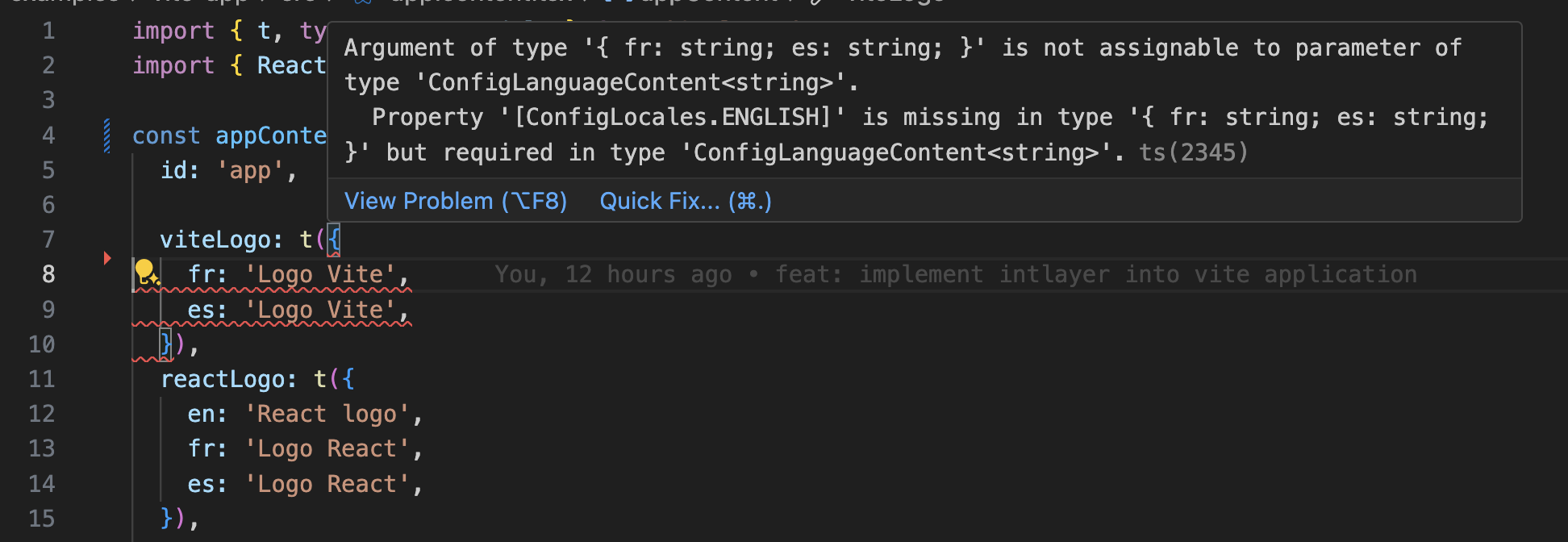
    Intlayer는 모듈 증강(module augmentation)을 사용하여 TypeScript의 이점을 활용함으로써 코드베이스를 더 견고하게 만듭니다.
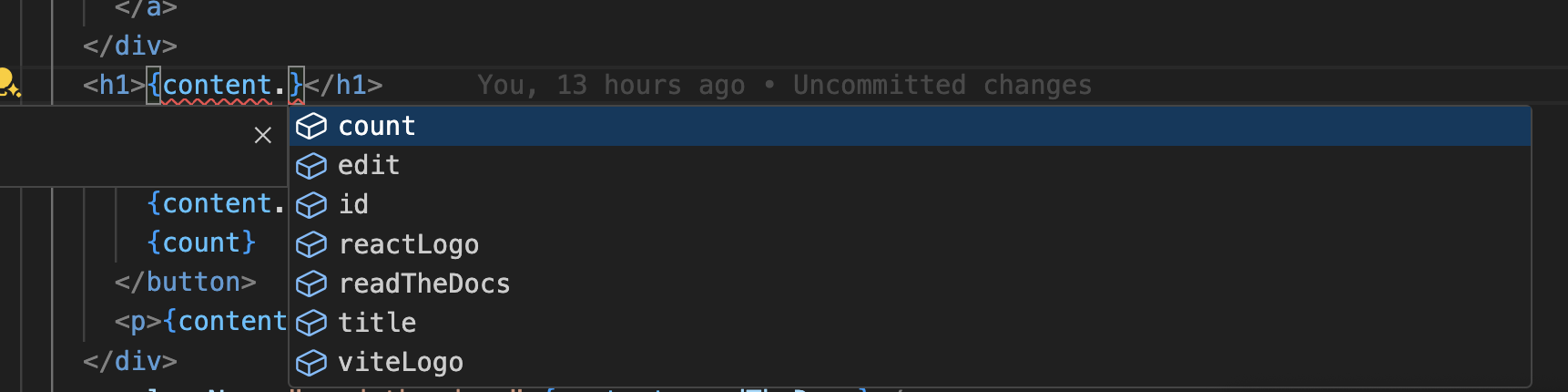
    자동 완성

    번역 오류

    TypeScript 설정에 자동 생성된 타입이 포함되어 있는지 확인하세요.

    tsconfig.json
    {
      // ... 기존 TypeScript 설정
      "include": [
        // ... 기존 TypeScript 설정
        ".intlayer/**/*.ts", // 자동 생성된 타입 포함
      ],
    }
    

    Git 설정

    Intlayer가 생성한 파일은 무시하는 것이 좋습니다. 이를 통해 Git 리포지토리에 커밋되는 것을 방지할 수 있습니다.

    무시하려면 .gitignore 파일에 다음 지침을 추가하세요:

    bash
    # Intlayer가 생성한 파일 무시
    .intlayer
    

    VS Code 확장 프로그램

    Intlayer 개발 환경을 개선하기 위해 공식 Intlayer VS Code 확장 프로그램을 설치할 수 있습니다.

    VS Code Marketplace에서 설치

    이 확장 프로그램은 다음 기능을 제공합니다:

    • 번역 키 자동 완성.
    • 누락된 번역에 대한 실시간 오류 감지.
    • 번역된 콘텐츠의 인라인 미리보기.
    • 번역을 쉽게 생성하고 업데이트할 수 있는 빠른 작업(Quick Actions).

    확장 프로그램 사용에 대한 자세한 내용은 Intlayer VS Code 확장 프로그램 문서를 참조하세요.


    더 알아보기

    더 자세히 알고 싶다면 비주얼 에디터를 구현하거나 CMS를 사용하여 콘텐츠를 외부화할 수 있습니다.